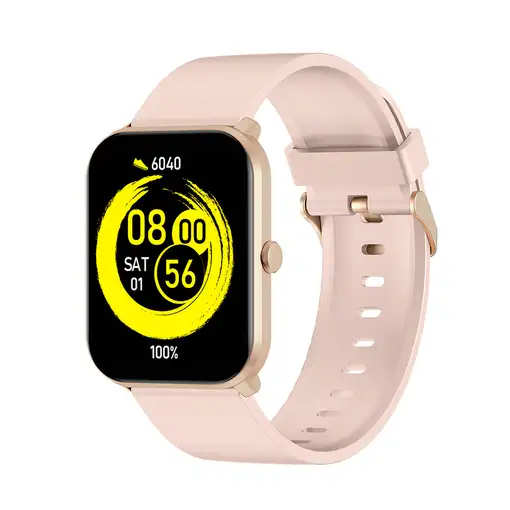


Smartwatch MAXCOM

Smartwatch MAXCOM

Smartwatch MAXCOM

Smartwatch MAXCOM

  0
Smartwatch MAXCOM
Smartwatch MAXCOM
Sold by Electrowifi
from 3 to 5days
-16%
48,00BeforeNow 40,00

Home Delivery:

  • Shipping costs  FREE
We recommend that you check the product when you receive it to confirm all its details since you will be able to find more detailed and up-to-date information about the product.
  • Characteristics

REF: 5908235977300 EAN: 5908235977300
MaxCom FW36 Aurum SE. Diagonal de la pantalla: 4,29 cm (1.69''), Resolución de la pantalla: 240 x 280 Pixeles, Pantalla táctil. Capacidad de batería: 220 mAh. Color de banda: Oro rosado

General information

  • Manufacturer reference: 5908235977300
  • Brand: MAXCOM
  • Colour: others
  • Model: FW36 Aurum SE
  • Special Features: Forma:Rectangular

Physical characteristics

  • Width: 4.46 cm
  • Height: 1.04 cm
  • Depth: 3.5 cm
  • Weight: - kg

Technical Features

  • OS: No-OS
  • Sensors: Sensor de nivel de oxígeno en sangre,Podómetro
  • Smartwatch Type: Smartwatch
  • Supports SD: Yes

Display

  • Screen size (cm): 4.2926 cm
  • Diagonal screen size (inches): 1.69 ''
  • Resolution (WxH) pixels: (240, 280)
  • Touch screen : Yes
  • Splash proof: No

Equipment

  • Pulse Sensor: Yes
  • Satellite Navigation System: No
  • GPS: No
  • Water resistance: Yes
  • Depth: 3.5 cm

Data + Connections

  • Bluetooth: No
  • Integrated Wi-Fi: No
  • NFC: No

Power supply

  • Battery Type: Ión de litio
  • Wireless Charging: No
  • Battery Capacity: 220 mAh

Security Resources and Products

  • GPSR Manufactures Name: MaxCom
  • GPSR Manufacturer Postal Address: -
  • GPSR Email Manufacturer: -
  • GPSR Corporate Website Manufacturer: -
  • GPSR Name Person Responsible EU: -
  • GPSR Postal Address Responsible Person EU: -
  • GPSR Email Responsible Person EU: -
  • GPSR Warning or Product Safety Information: -
Customer reviews (0)
0 out of 5 stars
Customer reviews
Be the first one to review it!
Add Eroski online to your home screenCerrar
Add Eroski online to your home screen

Click on the icon , then on "Add page to" and then click on "Home screen".

Click on the icon , then select "Add to Home Screen".

EROSKI uses its own cookies and those of third parties. If you expressly accept our cookies policy or continue browsing through different pages, accessing different...

Show full text

EROSKI uses its own cookies and those of third parties. If you expressly accept our cookies policy or continue browsing through different pages, accessing different areas and menus, this affirmative action implies your acceptance of their installation and use. For more information, please click here.

XClose cookie warning

eroski-gcp-front-dpl-d84878568-shq77

10.9.4.0