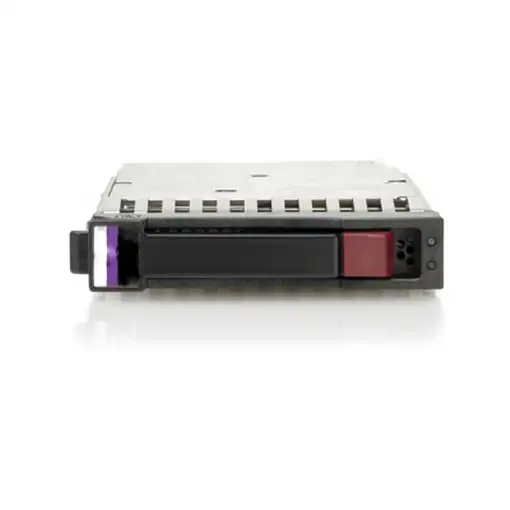


HPE 72GB 15K rpm Ultra320 Hot Plug SCSI Hard Drive disco duro interno 72,8 GB 1500

HPE 72GB 15K rpm Ultra320 Hot Plug SCSI Hard Drive disco duro interno 72,8 GB 1500

HPE 72GB 15K rpm Ultra320...

HPE 72GB 15K rpm Ultra320 Hot Plug SCSI Hard Drive disco duro interno 72,8 GB 1500

  0
HPE 72GB 15K rpm Ultra320 Hot Plug SCSI Hard Drive disco duro interno 72,8 GB 1500
Sold by GreaTecno
from 6 to 10days
Now 54,06

Home Delivery:

  • Installation not included  FREE
  • Installation included  8 €
We recommend that you check the product when you receive it to confirm all its details since you will be able to find more detailed and up-to-date information about the product.
  • Characteristics

REF: 286778-B22-RFB EAN: 5705965674215
HPE 72GB 15K rpm Ultra320 Hot Plug SCSI Hard Drive. Capacidad del HDD: 72,8 GB, Velocidad de rotación del HDD: 15000 RPM, Tamaño del HDD: 3.5'', Interfaz: Ultra320 SCSI

General information

  • Manufacturer reference: 286778-B22-RFB
  • Brand: HPE
  • Colour: others
  • Model: 72GB 15K rpm Ultra320 Hot Plug SCSI Hard Drive

Physical characteristics

  • Width: - cm
  • Height: - cm
  • Depth: - cm
  • Weight: - kg

Specific characteristics

  • Connections: Ultra320 SCSI
  • Storage capacity: Up to 500 GB
  • Storage: 72.8 GB
  • Technology: HDD
  • Disk interface: Ultra320 SCSI
  • Disk size (inches): Tamaño del HDD

More information

  • More information: 15000 rpm,Componente para:Servidor/estación de trabajo

Security Resources and Products

  • GPSR Manufactures Name: HPE
  • GPSR Manufacturer Postal Address: -
  • GPSR Email Manufacturer: -
  • GPSR Corporate Website Manufacturer: -
  • GPSR Name Person Responsible EU: -
  • GPSR Postal Address Responsible Person EU: -
  • GPSR Email Responsible Person EU: -
  • GPSR Warning or Product Safety Information: -
Customer reviews (0)
0 out of 5 stars
Customer reviews
Be the first one to review it!
Add Eroski online to your home screenCerrar
Add Eroski online to your home screen

Click on the icon , then on "Add page to" and then click on "Home screen".

Click on the icon , then select "Add to Home Screen".

EROSKI uses its own cookies and those of third parties. If you expressly accept our cookies policy or continue browsing through different pages, accessing different...

Show full text

EROSKI uses its own cookies and those of third parties. If you expressly accept our cookies policy or continue browsing through different pages, accessing different areas and menus, this affirmative action implies your acceptance of their installation and use. For more information, please click here.

XClose cookie warning

eroski-gcp-front-dpl-888c8d4f7-86kpw

11.0.0.3